MAE · a day with it

What was saidbecomes
what got done.

MAE is your company's private AI. It turns the commitments people make in meetings into tracked work with an owner and a date, checks in on that work where your team already is, and tells a manager what actually moved. It runs Comserv Connect's own five-person team every day.

Seventy-five seconds,
if that is all you have.

If you would rather watch than read, start here. Everything below is the same story with the detail put back in.

Explainer video slot assets/demo/mae/explainer-75s.mp4
A 75-second narrated explainer of the MAE daily loop. In production with our content desk, from the storyboard the product team is writing.

The people on the left.
MAE on the right.

Follow a single sentence from a meeting all the way to a closed task. The left column is what a person says or does. The right column is MAE, which nobody had to open, launch, or remember.

This replay is a written walkthrough of the daily loop, not a recording of a real meeting. We will show you MAE running on our own live data during the screen share.

Eight steps.
Your team does two.

A person approves the task and a person does the work. Everything between those two is MAE, and none of it needs anyone to open an app.

1
The meeting ends

Nobody presses a button and nobody writes up notes. The transcript comes in on its own, and MAE reads it the way a very attentive assistant would have: looking for the sentences where somebody committed to something.

2
Tasks are extracted

A commitment becomes a task with an owner and a date. Not a summary, not a bullet list nobody reads: a piece of work with a name on it. Each one keeps the sentence that created it, so when somebody says "I never agreed to that," you can both read what was actually said.

3
One tap approves it

Extraction is a suggestion, not a decree. The owner sees a card and confirms, corrects, or throws it away in one tap, without leaving Slack. This is the gate that keeps the board honest, and it is deliberately the lowest-effort thing on the page.

4
The morning brief

One message per person at the start of the day: what is due today, what slipped, and what is waiting on somebody else. It is short on purpose. A brief nobody reads is worse than no brief at all.

5
The check-in card

When a due date passes with no update, MAE asks, in a threaded direct message rather than a fresh ping. It asks once, politely, and it asks the person who owns the work rather than escalating straight to their manager.

6
The reply is graded

This is the part that surprised us most in our own shop. A one-word "done" does not close anything on its own. MAE reads the reply against what was actually promised, and an answer that does not answer gets asked again. Follow-through that only looks like follow-through stops counting.

7
Ticket oversight

For teams running a service desk, the same discipline applies to tickets: the ones sitting too long, the ones bouncing between people, the ones where the customer has been waiting on you and not the other way around. Judged against your thresholds, not a vendor's defaults.

8
The recap

At the end of the day, one email: what moved, what did not, and who is waiting on whom. A manager can act straight from it, and it is the same picture everybody else already saw in their own brief. No separate reporting exercise.

It comes to your team.
Not the other way round.

Software your team has to remember to open is software your team stops using. MAE lands where they already are, and the web app is for when you want to dig in rather than for daily use.

Slack
Threaded direct messages and cards with real buttons: approve, close, reassign, file a note. The busiest days stay scannable instead of becoming a wall of pings.
Microsoft Teams
The same posts for teams that live in Teams. Teams strips the buttons off cards, so the Teams version links back rather than acting in place. We would rather tell you that up front than have you find it out.
Email
The morning brief and the daily recap, which is how most managers actually consume it. Forwardable, readable on a phone, and short.
Phone and web
A voice interface for asking your own company's context out loud, and a web app for the board, the transcripts, the search, and the manager views.

Persistent, and
honest about its limits.

What happens when a commitment goes quiet. Two rungs on this ladder are marked "coming" because they are not built yet, and we would rather show you the roadmap than let you assume.

In your Slack,
your Teams, your inbox.

Almost nobody on our team opens the MAE web app on a normal day. This is what they see instead. These are the real renders, filled with an invented client so we are not showing you ours.

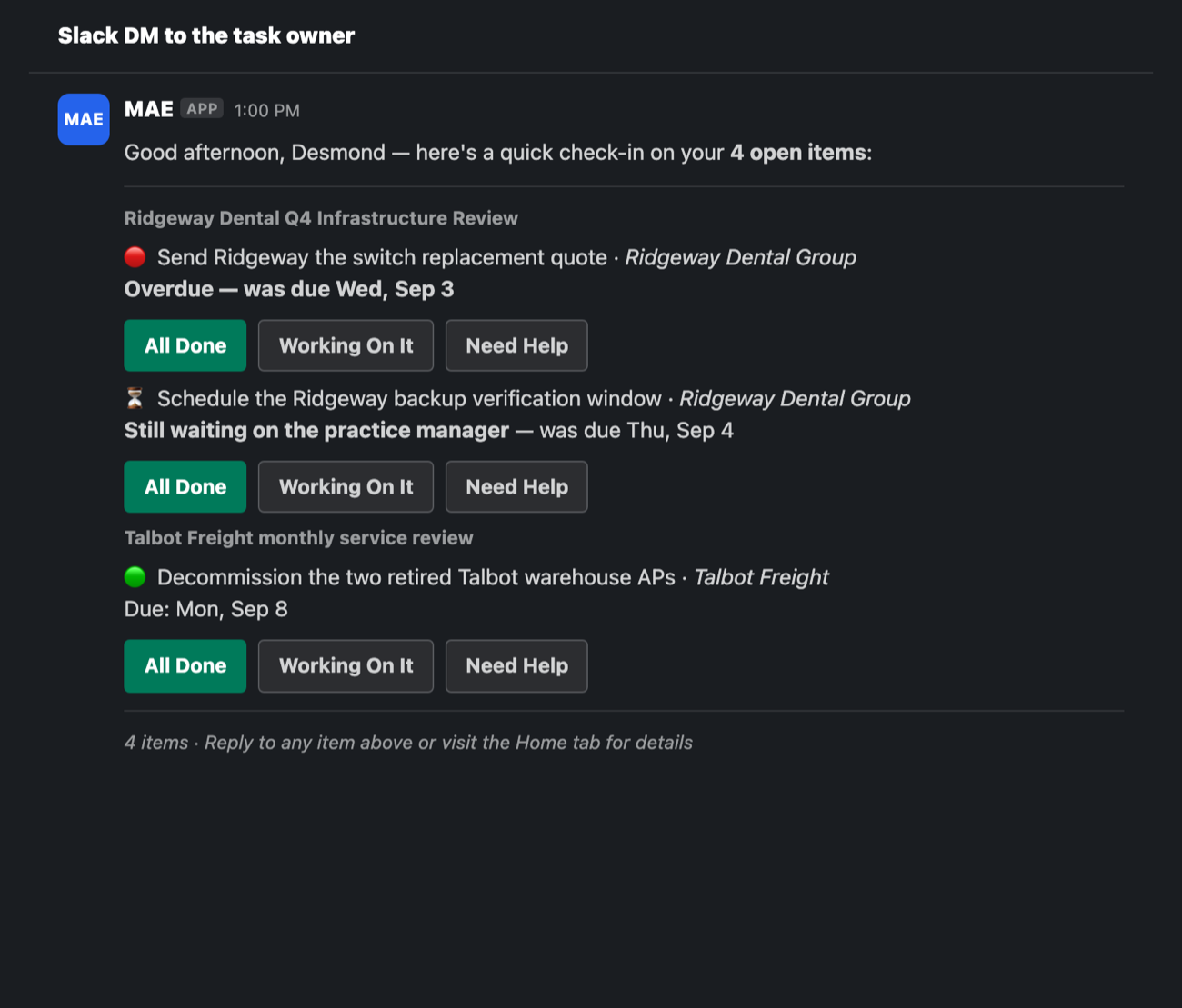
Slack
The check-in direct message: each open item grouped under the meeting it came from, with three buttons and a reply that gets graded.
Microsoft Teams
Card render pending assets/demo/mae/artifacts/teams-post.png
The same check-in in Teams, which strips card buttons, so the Teams version links back instead of acting in place.
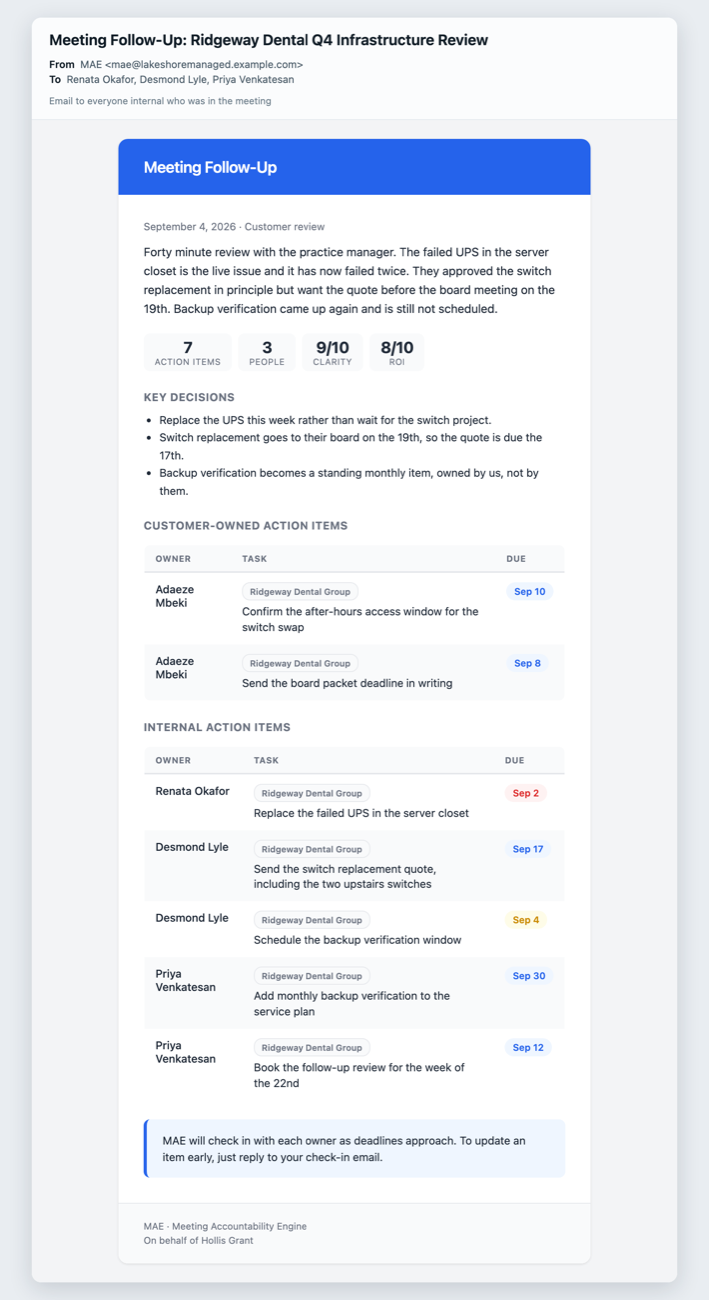
Email
The meeting follow-up: the decisions, who owns what, and when each item is due, split into theirs and yours.

For when you
want to dig in.

Product screenshot pending assets/demo/mae/01-my-day.png
My Day: what is due, what slipped, and what is waiting on somebody else.
Product screenshot pending assets/demo/mae/02-task-from-meeting.png
A task with the sentence from the meeting that created it, so there is no argument about what was agreed.
Product screenshot pending assets/demo/mae/03-ticket-oversight.png
Ticket Oversight: tickets sitting too long, judged against your own thresholds.
Product screenshot pending assets/demo/mae/04-manager-view.png
The manager view: what moved this week, what did not, and where the work is piling up.

It reads what your
company already writes.

MAE runs on your own context: your meetings, your documents, your SOPs, your tickets. Your data stays in your environment and is not used to train a public model. If your tool is not on this list, ask us: the pattern is the same wherever there is an API.

Fireflies Slack Microsoft 365 and Teams Google Workspace Autotask ConnectWise Monday.com Your documents, SOPs and playbooks and anything with an API

Per seat, with
a floor.

$50 per seat, per month

Ten-seat minimum. Included in Comserv managed-service plans, so if we already run your IT, you already have it.

The minimum is not a sales tactic. MAE works by seeing what a whole team commits to, and a two-person deployment does not have enough of a loop to be worth anyone's money.

Fifteen minutes.
Nothing to install.

Michael or Chris runs it
A person from our team, not a call center and not a sales development rep reading from a script.
Screen shared, phone or computer
Nothing to install and nothing to connect. You watch our screen. Fifteen minutes, and we hold to it.
Your scenario, not ours
Bring the follow-up that keeps slipping in your shop. We show you what MAE would have done with it.

Hear it, then
see it.

Call the demo line to hear what our voice agents sound like. Book fifteen minutes to watch MAE run on real data.

Demo line: +1 (929) 593-4959. It is a demo, so nothing you say reaches a real customer.